Post detail
Show post content, include comment,interaction.
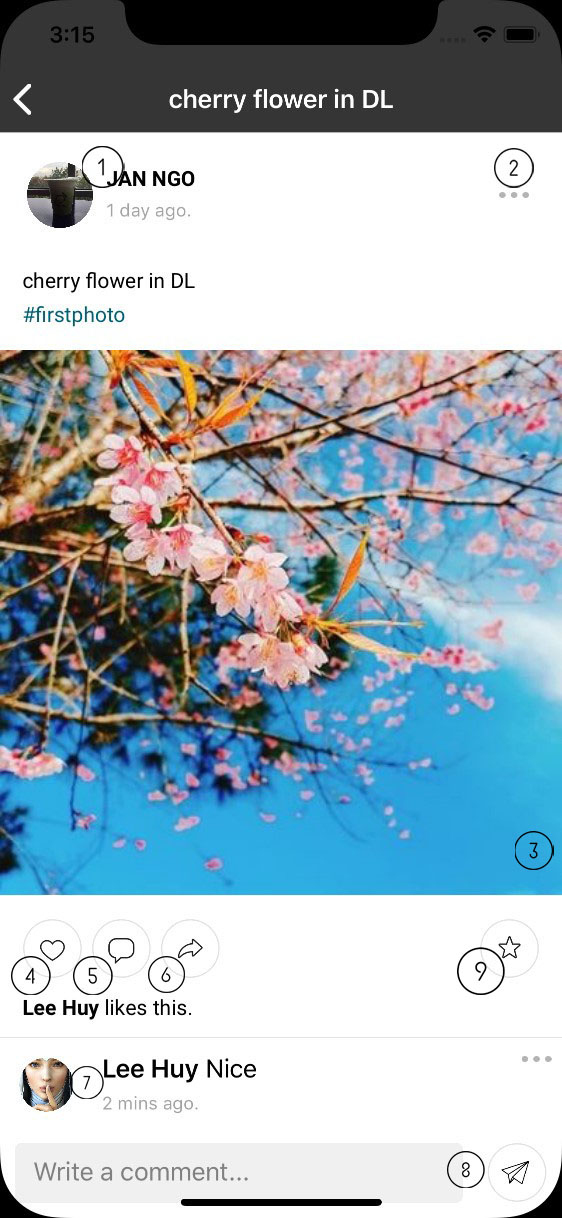
- Post info: user who creates post and time. When clicks on avatar or name, app will navigate to that person’s profile.
- Context menu: click on that button to open context menu. Menu is different between owner and others.

- Post Content: post content can be text, image, video or share post.
- Image/Video: when user click on image/video, dialog is open to show high quality image or video.
- Sharing post: app will show that post by detail.
- Like post
- Open keyboard. When user clicks on this button in main feed screen or profile screen, app will navigate to post detail page and open keyboard.
- Share post: app will navigate to create post screen with this post .
- Comments list: list of comment. User can open person who commented by clicking on avatar.
- Comment input: allow user to add new comment. Support multi-lines.
- Saved button: bookmark post. Button will be changed to blue when post is bookmarked.